Help
How ExtraLesson works, what each screen means, and what to do when something doesn’t go to plan.
Quick start
- Make your account. Your first question is free, and no card is needed.
- Work it on paper. Answer the question by hand, the way you will in the exam.
- TakeUpload a photo of your page. We read your working and fill in what we can. Check the answer boxes, then hand in.
- See every mark. Each mark comes with its reason, and every question ends with the worked solution. A full exam question a day is enough.
Watch it in a minute
One real question, from the photo to the marking. No sound; the captions run underneath.
Read the walkthrough instead
- A question in the style of the exam.
- Work it on paper first, the way you will in the exam.
- Then tap Take a photo of your page.
- On a computer the button says Upload a photo of your page.
- We read your page. Nothing is handed in yet.
- This is what we read: every line from your page.
- If one is not what you wrote, tap Not what I wrote under it.
- We fill the answer boxes from your page.
- Check each one before you hand in.
- Hand in when you are ready. Marking takes a few seconds.
- Your score for the question comes first.
- A lost mark comes with its reason in red, and what to do differently.
- Think a mark for your working is wrong?
- Tap Ask for a re-mark, and a person checks it.
- Every question ends with the worked solution.
Getting started
What you get before you pay, and how to find where to begin.
Your free first question
Right after you make your account, one short exam-style question (up to 4 marks) is waiting for you. You work it on paper and it is marked exactly like every other question, so you can see how marking works before anything else.
It is free, it is one question per account, and it does not use up a free session. If you see You have had your first question, it is done: start a session next.
The diagnostic
About 8 quick multiple-choice questions across the syllabus, and nothing is scored. It puts your topics in order so your sessions start in the right place. If you do not know an answer, tap I don’t know: that tells us more than a guess.
It is free, whether or not you have paid, and you can take it once every 90 days, counted from the day you start one (starting one and stopping still counts). If you see You have already done the diagnostic, your sessions already start where it put you.
Free sessions
You get 2 full sessions free. Every session you start counts, finished or not; the first question and the diagnostic do not. When they are used you will see Your free sessions are used and the way to get full access (see Paying).
Your account and signing in
You sign in with your email and a password of at least 10 characters. We keep you signed in on that device for 30 days, so on your own phone you rarely type it.
Forgot it? Forgot your password? on the sign-in page emails you a link. It works once and expires after 30 minutes. Setting a new password signs you out on every other device.
Practising
Your daily session, choosing a topic, and going back over marks you lost.
Today’s session
Start today’s session gives you a full exam question, weakest topics first, so your work goes where the most marks are. Questions you answered in the last 14 days are left out.
Your answers save as you type (you will see Saved). Leave whenever you like: Carry on with your session takes you back to where you were. Answers you typed but did not hand in are kept for 30 days.
Practise a topic
Under Or choose for yourself on your notebook, pick any topic from the list and tapclick Practise for a session on just that topic.
Revisit mistakes
Revisit mistakes gives you new questions on the exact things you lost marks on, so you can win those marks back. It is there when you ask for it, on your notebook.
It uses marks you lost more than 3 days ago and within the last 90 days. Marks lost more recently are still fresh, and redoing them straight away would only be repeating them: that is what Nothing to revisit yetmeans.
Your grade estimate and progress
A grade estimate appears once we have seen 35 marks of your work in every module. Until then your notebook shows how close each module is. The estimate assumes an average school-based mark and moves with every question.
Progress shows each topic as Strong, Building or Weak. History lists every question you have answered and opens each one at its marking. The days in a row count is just that, a count: nothing is won or lost by it.
Your photo
How we read your working, and what to do when the photo does not work.
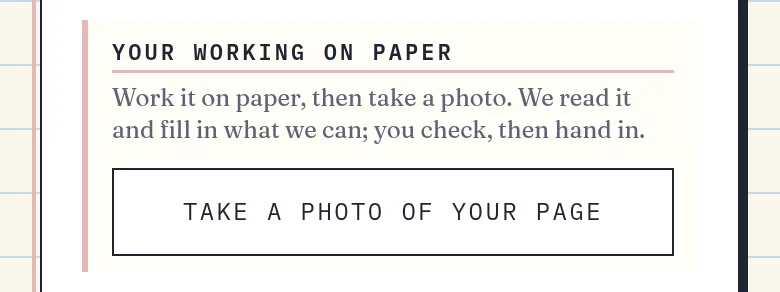
TakeUpload a photo of your page
Work the question on paper first. Then tapclick TakeUpload a photo of your page. On a phone this opens your camera; on a computer you choose a photo file.
For a good read: a flat page, good light, and the whole answer in the frame. You will see Reading your page… while we read it. Nothing is handed in until you press Hand in.
“This is what we read”
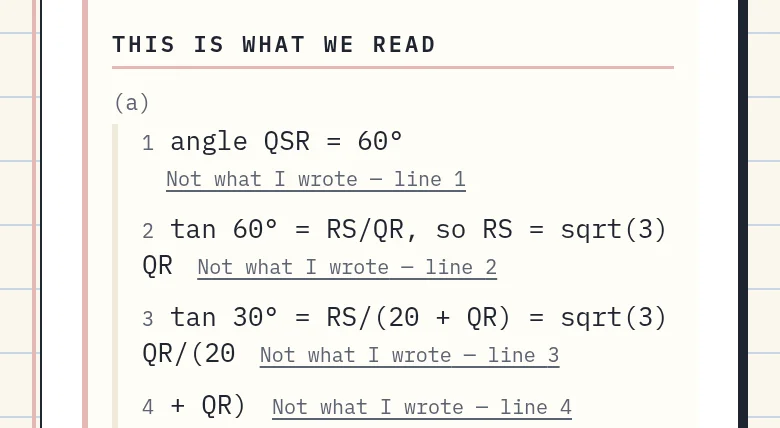
After the photo, This is what we read lists every line we read, grouped by part. A line marked hard to read is one we are less sure of: check it.
We also fill in empty answer boxes from your page, marked From your page — check it. We never change a box you typed in: if your page says something different you will see Your page reads … — left as you typed it. Check every box before you hand in.
A line that isn’t what you wrote
If we misread a line, tapclick Not what I wrote under it. That line is left out of marking. Changed your mind? Put it back undoes it. You can do this until you hand in; after that, use a re-mark instead (see If a mark looks wrong).
How many photos you can send
Each question takes up to 2 photos, before and after you hand in together. A photo that fails to send, or that we fail to read because of a problem on our side, does not count. To send another, tapclick Take it againUpload another; it shows how many you have left.
When you see No retakes left, the read you have is kept. You can still fix any line yourself with Not what I wrote, or type your answers in the boxes.
“Couldn’t read the page”
We could not make out the writing, so nothing was marked. Whether it used up one of your 2 photos depends on why: a page we received but could not make out does; a read that failed on our side does not. Try another with a flat page, good light and the whole answer in the frame, or type your answers instead.
“Too many at once”
Lots of photos were sent in a short time. Wait 1 minute and try again; nothing you have done is lost.
Typing your answers instead
You can always type answers in the boxes and hand in without a photo. The marks for your working (method marks) need a photo, though: a part that says Work this on paper — it’s marked from your photo can only be marked from one.
Graph questions
Draw the graph on graph paper. If your photo shows the drawing, we check it, and those marks count in your score and your estimate, whether you earned them or not. If it does not, those marks are left out of both: after you hand in, you see the finished graph and a checklist of what an examiner looks for, so you can check your own.
Handing in and marking
What happens when you hand in, and how to read your marking.
Handing in
Hand in sends your answers for marking. If any box is empty the button says Hand in as is: blanks score zero, just like the exam, and you still get the worked solution. Once handed in, your answers are closed.
Reading your marking
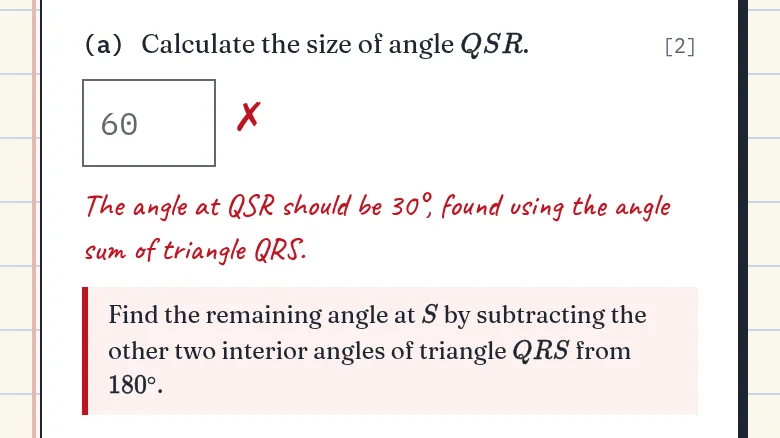
Each answer gets a ✓ or a ✗. Where a mark was lost, the reason is written in red, like a teacher’s pen, and every question ends with the worked solution.
CXC gives marks three ways: CK for knowing what to do, AK for doing the working, and R for explaining why.
Adding a photo after you hand in
If a question has marks for working that we could not see, you can still TakeUpload a photo of what you wrote after handing in. It can only add marks: nothing you have already earned can change.
When a mark says “not assessed”
When the marker is not sure, it holds the mark back instead of guessing, so it is more likely to under-mark you than over-mark you. Those marks show as not assessed. If you think one is yours, ask for a re-mark.
“Marking did not finish”
Sometimes marking stops partway. Your marks so far are unchanged and what we read is kept: tapclick Try marking again. You do not need a new photo.
If a mark looks wrong
How to question a mark, and which way to use when.
Ask for a re-mark
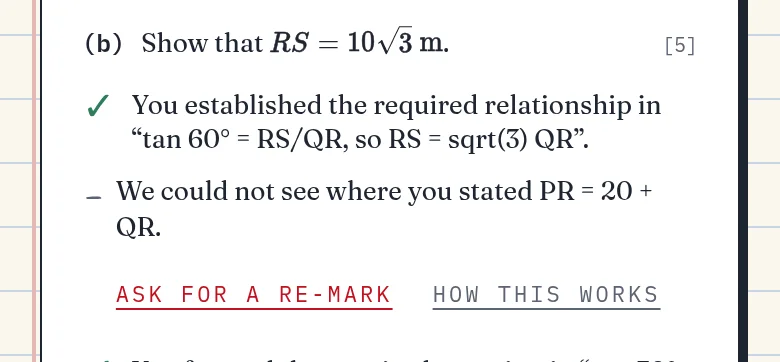
Under a mark for your working that you did not get, tapclick Ask for a re-mark. A person reads your working against the mark scheme and replies to you by email. You can ask once for each mark.
Re-marks are for marks on your working. If a typed answer looks marked wrong (for example, you wrote the right answer in an equivalent form), email us at support@anansi.xyz from your account’s address and say which question.
Not what I wrote, or a re-mark?
Before you hand in, if we misread your page, use Not what I wrote on that line: it is instant and you can undo it. After marking, if you think a mark for your working is wrong, use Ask for a re-mark.
Account and access
Paying, refunds, and your exam sitting.
Paying for full access
Full access is one payment of $49. It runs until the sitting you are entered for is over, plus 30 days. There is no subscription and nothing renews.
You pay by card or Apple Pay. Use the same email address as your ExtraLesson account, so the payment reaches it. Someone else can pay for you, as long as they use your email.
Refunds
If it is not what you expected, ask within 14 days of paying and we refund you, no questions asked. Use Request a refund in the Account menu, or email us.
After a refund
Your access ends straight away and sessions stop. Everything you have done stays in your notebook, and you can read it whenever you want. You can get access again later.
Your exam sitting
You choose your sitting (for example May/June) when you sign up, and you can change it any time in the Account menu with Change sitting. Access you paid for stays with the sitting it was for.
When your sitting is over you will see Your sitting has passed. Your notebook stays open to read. To keep practising, tapclick Enter for another sitting and get access for that one.
When there are no questions to give you
Now and then there may be no questions ready for your modules or for a topic you chose. Try another topic or the usual session, and check back soon: everything you have done stays where it is.
What’s covered
What ExtraLesson practises in the CSEC Mathematics paper, and what it does not.
How much of the paper
About 90% of the marks in a CSEC Mathematics paper. Graphs you draw on paper are included: a photo lets us mark the drawing, worth about 3 marks a paper. Constructions with ruler and compasses (roughly 7 marks) are not covered, so practise those with past papers.
Your privacy
What we keep, and for how long.
What we keep
Photos of your page are deleted 7 days after you take them. We keep what we read from them, your answers and your marks, so your notebook stays complete. Answers you typed but did not hand in are kept for 30 days.
Nothing you send is used to train AI models, and we never sell your data. To delete your account, email us from the address you signed up with. The full details are on the privacy page.
Common questions
- Is it the whole paper?
- Not quite, and we say so: ExtraLesson practises about 90% of the marks in a CSEC Mathematics paper. Graphs you draw on paper count — take a photo of them and we mark the drawing, worth about 3 marks a paper that you earn no other way. Construction with ruler and compasses — roughly 7 marks — we do not cover at all, so that stays with past papers. We do not prepare private candidates for Paper 032.
- Does it work on a basic phone?
- Yes. Any smartphone with a camera. Low data by design — no video streaming.
- They’re re-sitting in January 2027 — is this for them?
- Especially for them. January 2027 candidates re-sit Papers 1 and 2 (project marks carry over), which is exactly what this trains. Whatever run-up is left, a full exam question a day on the topics costing the most marks, with the working marked rather than the answer ticked.
- Are these CXC’s own questions?
- No — CXC’s papers are their copyright. Our questions are original and exam-style, written to the current public syllabus and marked to mark-scheme conventions, and reviewed by a teacher who taught CSEC Mathematics in the Caribbean (me).
- When do they see a grade estimate?
- A grade estimate once we’ve seen enough of their work — 35 marks in every module. Until then the notebook shows how far each module has got.
- How will I know it’s working?
- We do not send reports: they can open their own marked working whenever they want to, and you will hear how it is going from them, not from us.
- What if it doesn’t help?
- Email us within 14 days of paying and we refund you — no questions, no forms. Tell me when the marking is wrong and it gets fixed.
Still stuck? Write to us
We read every email and reply as soon as we can. Write from the address on your account, so we can find it, and say which question or screen you mean.